



2026 AUTOBACS SUPER GT Round8


2026 AUTOBACS SUPER GT Round8
Information Regarding MobilityStation Ticket Purchase
Information
・Please be aware that purchasing tickets from unauthorized sources (other than MobilityStation and agents commissioned by Honda Mobilityland Corporation to sell tickets) may expose you to crimes or troubles.
Tickets purchased or obtained from sources other than authorized outlets may be invalidated without notice based on the terms of use, and admission on the day may be refused.
・Orders cannot be canceled after application due to customer circumstances.
Also, please note that cancellations and refunds for purchased tickets are not accepted under any circumstances. Thank you for your understanding.
・Please check the MobilityStation Terms of Use before purchasing.
・Ticket availability fluctuates due to upgrades and changes. Please check MobilityStation for the latest stock status, including resale listings.
・Regarding receipt issuance on MobilityStation, receipts can only be issued on the purchase details screen accessible from the "i" mark at the top right of My Tickets on MobilityStation when paying by credit card. If you require an invoice-compliant receipt, please use credit card payment.
* To prevent duplicate issuance of receipts, we cannot issue receipts except from the purchase details screen in My Tickets.
* If you select payment at a 7-Eleven store, we cannot issue any receipts other than the "Ticket Payment Receipt" issued at the store.
However, the purchase details screen, which can be displayed by clicking the "i" mark at the top right of My Ticket, includes supplementary information for the items listed on the qualified simplified invoice. Therefore, the combination of the "Ticket Payment Receipt" and the "PDF of the Purchase Details Screen" can be treated as fulfilling the requirements of a qualified invoice.
* Receipts and purchase detail screens are issued per order. They cannot be split or combined.
* For purchases made through Asoview!, please check here (external site).
For details, please refer to the Q&A "About Purchases" on MobilityStation.
・You may be asked to present identification that can verify your age upon entry.
How to Display Electronic Tickets on MobilityStation
・While logged into MobilityStation, tap My Tickets → "Tickets" from the MENU at the top left to display your purchased event tickets.
On the day of the event, please tap "Today's Ticket".
You can check the Precautions for each ticket by tapping the "!" in the seat type section of the ticket.
About Ticket Changes
■ Age Category Changes
For electronic tickets, age category changes are only possible to Adult (24 years and older) if the ticket is unused and within the valid period. A fare difference payment is required when making changes.
From 12:00 a.m. on November 7 (Sat), the ticket price will switch to the same-day rate. Please note that if you make changes, the fare difference will be calculated based on the same-day rates.
* Some tickets cannot be changed. Changes to the 3 years old to junior high school student category or U23 category are not possible.
* Please make changes from “MobilityStation MENU > My Tickets > Change > Change to Adult (24 years and older) Ticket”.
* Tickets issued at Seven-Eleven stores cannot be changed.
■Seat Change (Upgrade)
If you have an electronic ticket and there is availability, excluding group seats and some tickets, tickets with an adult fare equal to or higher than the current one can be changed in seat location or upgraded.
The fee for each ticket is the difference before and after the change or upgrade, and if the difference is 0yen, a handling fee of "500yen" is required.
For children aged 3 to junior high school students, if the upgrade results in a difference of less than 0 yen, neither the handling fee nor the difference will be refunded.
From 12:00 a.m. on November 7 (Sat), the ticket price will switch to the same-day rate. Please note that if you make changes, the fare difference will be calculated based on the same-day rates.
* You cannot change to a seat with a lower price than the ticket you have already purchased.
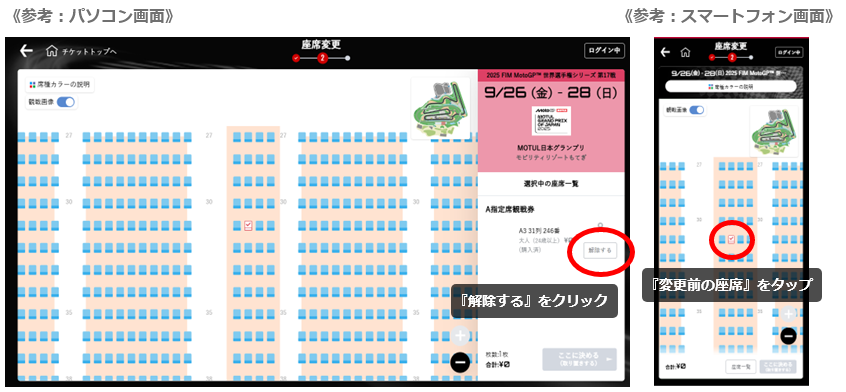
* When making changes, please be sure to release your previous seat. Before purchasing, please check the contents and price in your kart to avoid additional purchases.
* Please make changes from "MobilityStation MENU > My Tickets > Change > Change Seat".
* Tickets issued at 7-Eleven stores cannot be upgraded.
About Parking
■Designated Parking Ticket
Please present the QR code of the designated parking ticket purchased in advance at the South/North Gate. After the QR code is authenticated, a mirror-hanging designated parking ticket will be handed to you.
The following designated parking tickets specify the area. Specific parking spots cannot be designated.
・E0 Tent Area Parking Ticket
・S4 Tent Area Parking Ticket
・S2 Parking Ticket
・S3 Parking Ticket
・V-shaped Auto Camp Site (*)
・Green Camp Site Parking Ticket
*Designated parking tickets with mirror-hanging tags showing the parking section number will be distributed in order of arrival. If you wish to park multiple vehicles adjacent to each other, please enter through the gate together.
■Purchase-Limited Products
If you select one of the following tickets, you can purchase additional nearby parking tickets (for a fee) as purchase-limited products.*Limited quantity
・Executive Suite
・VIP SUITE
・VIP Terrace Premium
・S Seat
・Grand Deck
・1 Corner Terrace Sky Deck
・Victory Corner Deck
・Victory Corner Terrace (Premium, Box Seat, Dome Tent Seat, Party Table Seat, Free Area)
・SORA Site / SORA Site (Dogs Allowed)
・T5 (Turn Five) Deck * Additional tickets are free of charge.
* If desired, customers need to select it themselves.
* Purchase-limited products (parking tickets) for each group seat are limited to one vehicle per section.
* If your reservation is completed with a ticket issued at a Seven-Eleven store, you cannot make additional purchases of limited-purchase items.
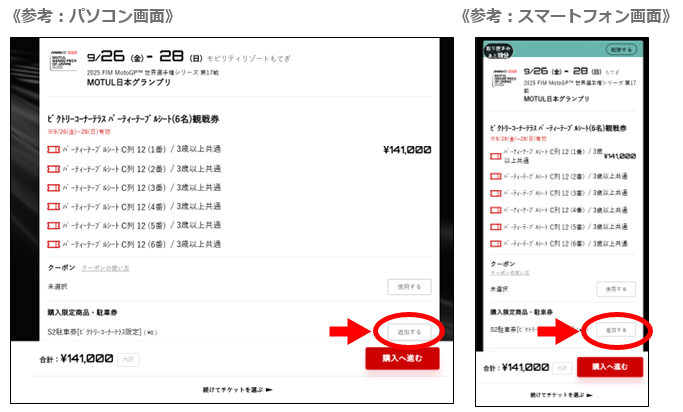
■ Addition of Purchase-Limited Products
If you have an electronic ticket and stock is available, you can add purchase-limited products (parking tickets) after purchasing tickets, except for some tickets.
* Please add from “MobilityStation MENU > My Tickets > Change > Add Purchase-Limited Products.”
* The addition of purchase-limited products for each group seat is limited to one unit per section.
* Tickets issued at 7-Eleven stores cannot have purchase-limited products added.

■ How to Purchase Course-Side Camp Parking Tickets with Section Designation
Select “Log in to MobilityStation > Mobility Resort Motegi > Various Tickets & Reserved Seats Selection > SuperGT”
Select “Filter by Conditions (Smartphone) > Select Seat Type > Course-Side Camp Parking Ticket”
The map will zoom in, so select and purchase your desired section.
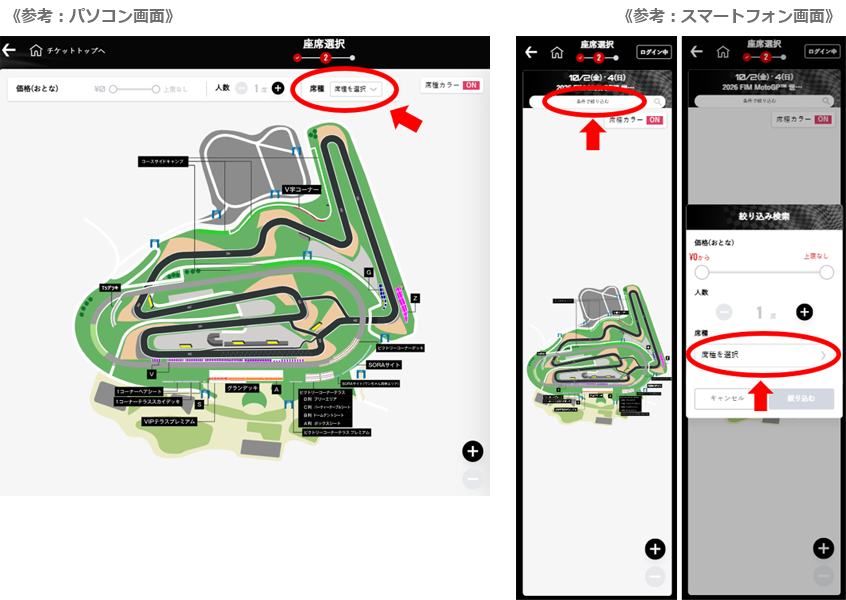
* If you select the course-side camp parking ticket from “[Fastest Recommendation] Automatic Reserved Seat Selection” or “Parking Ticket Only,” seating will be assigned automatically.
About Purchase and Payment
■Sales Outlets

■Payment Methods (When Purchasing on MobilityStation)
●Credit Card (You can choose to receive an e-ticket or Seven-Eleven in-store issuance)
Available cards: VISA, MasterCard, JCB, American Express, Diners Club (lump-sum payment only)
* Debit cards, prepaid cards, or credit cards issued overseas may not be able to be registered.
The cards that can be registered are determined by each card company's payment processing service, so we are unable to respond to inquiries about this.
* If paying by credit card, you cannot choose Seven-Eleven in-store ticket issuance.
●Seven-Eleven in-store payment (ticket collection is Seven-Eleven in-store issuance only)
Cash, electronic money "nanaco" (*points are not awarded), and credit cards are available.
Please check the Seven Ticket User Guide for payment and ticket collection methods.
*If you purchase 20 or more tickets at one time, or if the total payment amount is 300,000 yen or more, you cannot choose in-store issuance and payment.
* Selection of Seven-Eleven in-store payment: until Thu, Nov 5, 23:59. After Fri, Nov 6, you will no longer be able to choose Seven-Eleven in-store payment.
■ Fees (when purchasing at MobilityStation)
●Seven-Eleven In-Store Issuance and Payment
In-store payment fee 260 yen / per transaction (only for in-store payments)
Issuance fee 130 yen / per ticket
* If you select Seven-Eleven in-store payment, please complete the payment procedure within the payment deadline.
Please check the deadline on My Ticket or in the purchase completion notification email. Applications will become invalid after the deadline.
●Resale (Electronic Tickets Only)
<Listing>
Listing fee (per listing): Up to 13,500yen listing price…660yen (tax included) 13,501yen and above…5% of the transaction amount
Transfer fee (per listing): 660yen (tax included)
(Some tickets cannot be resold. Tickets purchased using coupons cannot be listed for sale.)
<Purchase>
Free
About Supporter Seats
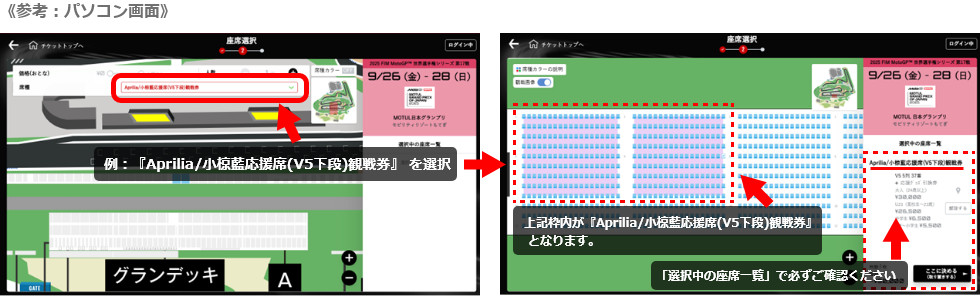
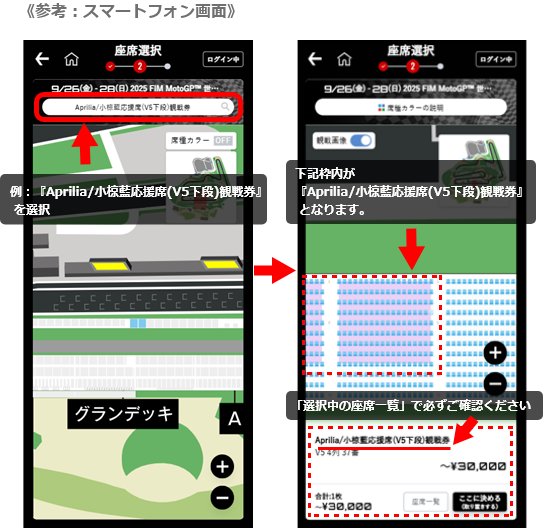
Regular V Seats and V Seat Supporter Seats are sold as separate products.
Please be sure to confirm the seat type before completing your purchase.
* When you narrow down and select a seat type, the background color of the corresponding seat type will change to indicate your selection. Please be aware that other seats belong to different seat types, so please be careful when making your purchase.
※The price is displayed as the total price.
※The photos and illustrations used are for illustration purposes only.